Leads come in from five directions. Follow-up happens by hand between jobs. The ones that slip through never come back. CRM automation is the infrastructure that catches every lead and carries it to a booked job — not a piece of software you log into, but a revenue-protection system that runs while your team is on the roof, under the crawlspace, or out on a call.
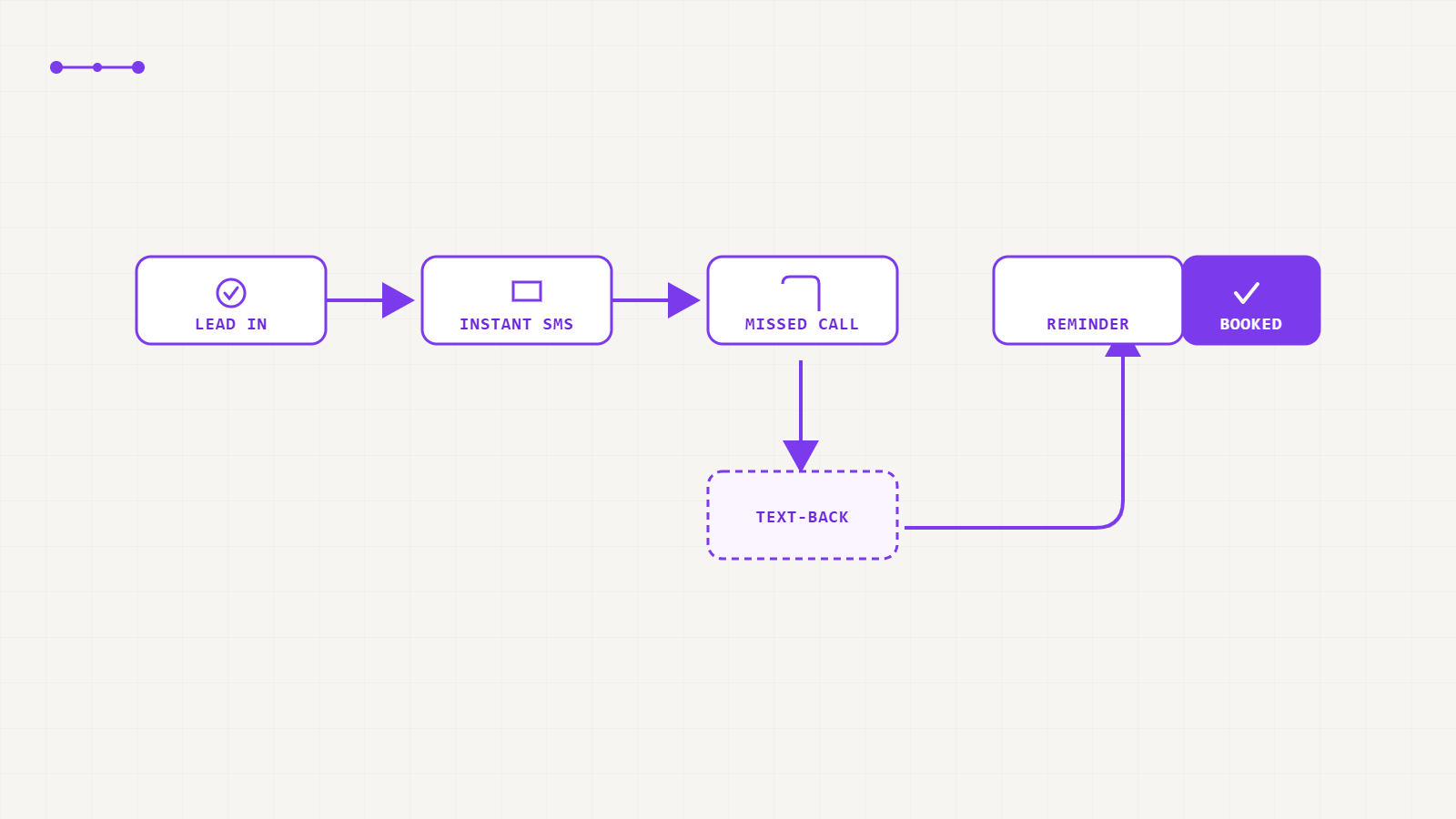
CRM automation is a set of pre-built rules that respond to a lead's behavior — form fill, call, missed call, non-reply — with the right message at the right time, without anyone lifting a finger. For home service businesses it runs on 7 core workflows, from a 5-minute instant response through after-hours capture, multi-touch follow-up, appointment reminders, and post-quote nurture. It isn't a call-center replacement — it's a revenue-leak prevention system. An HVAC client implementing the full stack saw 257 GBP calls and a +36.7% call volume increase in 60 days — not from more ad spend, but from finally catching the leads already coming in.
The word "CRM" gets used to mean two different things: the contact database where leads live, and the automation layer that acts on those leads. Most contractors have the database. Almost none have the automation. The database stores leads. The automation is what turns them into booked jobs.
The reason automation outperforms manual follow-up isn't the technology — it's that consistency at scale is impossible to maintain by hand, and automation never forgets, never gets busy between jobs, and never goes home at 5 PM. That's why the Booked-Job Pipeline™ treats CRM automation as Stage 4 of 6 — the infrastructure layer that makes every other stage compound.
Each has a trigger (what sets it off), an action (what fires automatically), and an outcome (what revenue it protects). The message copy changes by trade; the structure doesn't. These are the seven workflows we build inside every Funnels & CRM engagement.
A homeowner submits a form or enters from a lead ad at any hour. The rule: a personalized SMS fires inside 5 minutes, using their name and the specific service they asked about. A message that says "Hi Sarah, thanks for reaching out about your roof — I'll call you in the next few minutes" doesn't read as automated. It reads as attentive. This single workflow recovers the largest share of lost leads, because it catches the lead while they're still on their phone and before a competitor has responded.
Leads arrive from Google Ads, Local SEO, Google Business Profile calls, Facebook lead ads, and your website contact form — often on the same day. Without a single pipeline, they scatter across three inboxes and a sticky note. This workflow routes every source into one CRM pipeline, tagged by origin, the moment the lead enters. The result: no lead missed, and full attribution between every channel and the booked jobs it produces.
No reply to the first message within 2 hours. Most contractors stop here. This workflow doesn't. A homeowner who doesn't answer Tuesday's call isn't dead — they're at work. The cadence: Day 0 SMS + call attempt → Day 1 SMS → Day 2 email → Day 4 SMS → Day 7 final touch. The 5-to-8 touchpoints that lead research says are needed before booking — delivered automatically, without anyone tracking a spreadsheet.
Around 38% of home service inquiries arrive evenings and weekends — when the homeowner finally has time to deal with the broken AC, the storm-damaged roof, or the leaking pipe. Most contractor phones roll to voicemail. Fewer than 20% of homeowners who hit voicemail call back. This workflow fires an instant hold message — "We received your message and will call you first thing tomorrow" — that keeps the lead committed instead of triggering a search for who answered first.
A booked appointment without a confirmation and reminder sequence has a no-show rate of 20–35% across home service trades. This workflow fires instantly when the appointment is confirmed (so the homeowner has it in writing), then again 24 hours before, and once more 1 hour before. Without adding a single manual task, no-show rates fall below 10%. At 30 appointments a month, moving from 25% to 8% no-shows recovers 5 estimate slots — every single month.
You send a quote for a roofing job or HVAC replacement. No reply for two days. The instinct is to follow up once, hear nothing, and move on. The problem: high-ticket home service decisions run on a 30–90 day consideration window. The contractor who's still in front of the homeowner at week four with a relevant case study or seasonal prompt wins the job. This workflow runs a quiet, professional nurture sequence — not a blast — for the full consideration window.
A lead goes quiet for 30+ days — moved to the "cold" bucket and forgotten. But you already paid to acquire it. A re-engagement campaign fires: a new offer, a seasonal hook ("Storm season is coming — we're scheduling free roof inspections this week"), or a direct re-qualification attempt. This is revenue already paid for that most contractors have silently written off. Even a 5% recovery rate on cold leads produces real jobs — at zero additional acquisition cost — because the ad spend already happened.
Book a free 20-minute audit. We'll map your current lead flow against these 7 workflows and show you exactly where jobs are falling through.
"What CRM should I use?" bundles two different questions. Searches for home service software are dominated by ServiceTitan, Housecall Pro, and Jobber — but those tools solve a different problem than the 7 workflows above.
| Platform | What it's built for | Where it sits in the pipeline | Typical use case |
|---|---|---|---|
| GoHighLevel | Lead capture, SMS/call automation, follow-up sequences, funnels, attribution | Before the job is booked | Marketing CRM — getting the lead to the calendar |
| ServiceTitan | Dispatching, technician scheduling, invoicing for larger operations | After the job is booked | Field-service management — running the job once it's on the calendar |
| Housecall Pro | Scheduling, invoicing, and payments for small-to-mid crews | After the job is booked | Field-service management — smaller team alternative to ServiceTitan |
| Jobber | Quoting, scheduling, and client management for small teams | After the job is booked | Field-service management — lightweight option for growing teams |
Many contractors run both: GoHighLevel (or similar) for everything before the booking, and a field-service platform for everything after. Neither replaces the other.
GoHighLevel consolidates CRM, automation, SMS, email, landing pages, and appointment scheduling in one platform — eliminating the tool sprawl (separate CRM + separate texting tool + separate calendar) that creates the gaps leads fall through. As a GoHighLevel Certified Agency Partner, we don't just use the platform; we build on it at depth across trades, meaning the workflow architecture is tested and tuned for roofing, HVAC, solar, plumbing, and remodeling specifically — not adapted from a generic marketing agency template.
One important note: GoHighLevel is a platform. Results depend entirely on how it's configured. A misconfigured GHL install produces exactly the robotic, ineffective automation that has burned contractors on the idea of CRM before. The 7 workflows above are the configuration layer that makes the platform perform — and that's the work that requires both platform knowledge and home service industry depth.
This is the most common reason contractors avoid automation — usually because they've seen it done badly. The fix is personalization, not less automation. A message that uses the homeowner's name, references the exact service they asked about, and reads like a text from a real person lands nothing like a generic blast. Done right, the homeowner can't tell the first response was automated — they just know someone got back to them in two minutes rather than two days. Automation handles the speed-critical first touch and the routine reminders; your team still makes the calls that close the job.
Automated texting to consumers falls under the TCPA (Telephone Consumer Protection Act), which generally requires prior consent before sending automated marketing messages. A homeowner submitting their number through your own form typically satisfies this for replies tied to that inquiry — but a properly built CRM workflow captures and timestamps that consent rather than assuming it, and gives every contact a clear opt-out path. This isn't a checkbox; it's part of what "properly built" means, and it's part of what we configure during every build.
CRM automation doesn't replace your ad spend or your SEO. It's what determines whether that spend converts into revenue.
This HVAC contractor was getting calls and form fills, but no system existed to catch them: missed calls went to voicemail and died, no after-hours coverage, no follow-up sequence, no appointment reminder. The ad spend was working — the infrastructure to convert it wasn't. We built the full 7-workflow stack on GoHighLevel: missed-call text-back, instant response, 7-day follow-up sequence, after-hours capture, appointment confirmation and reminders. In 60 days, the Google Business Profile alone drove 257 inbound calls, and total call volume increased 36.7% — with no change to the ad budget.
Workflow specifics vary by trade and call volume. Book a free audit for a build plan tailored to your business.
The exact audit we run before taking on a new client — see where your site is leaking booked jobs.
Either way, every lead that enters without automation is a job you might already be losing. Book a free 20-minute pipeline audit and we'll map the exact workflows that would plug your biggest follow-up gaps — the ones quietly costing you booked jobs right now.